pip install -i https://mirrors.tuna.tsinghua.edu.cn/pypi/web/simple some-package
1.PIL和opencv打开图像和保存图像
#opencv

img_path = os.path.join(path, img_name)
img = cv2.imread(img_path)
img_resize = cv2.resize(img,(300,300))
resized_img_name = 'reshape_'+img_name
resized_img_path = os.path.join(path, resized_img_name)
print(resized_img_path)
cv2.imwrite(resized_img_path,img_resize)
#PIL
img=out_net["x_hat"].cpu().numpy().squeeze(0).transpose(1,2,0)
img=Image.fromarray(np.uint8(img*255))
img.save("./testres/"+img_name)
两个常见的坑: 1、TypeError: Cannot handle this data type: (1, 1, 300), <f4 没有把图像转换为WH3的格式,需要transpose(1,2,0)
2、TypeError: Cannot handle this data type: (1, 1, 300), <u1 没有把图像转换uint8,一般tensor都是0-1,所以需要*255
2.os 列出全部文件:os.listdir(path)
创建文件夹:推荐嵌套创建:os.makedirs()
缺少libturbojpeg 库 安装via:sudo apt-get install libturbojpeg
很多帖子都是碰到了版本不匹配,但是我ubuntu经验比较足,知道那个nvidia-smi显示的是最高版本
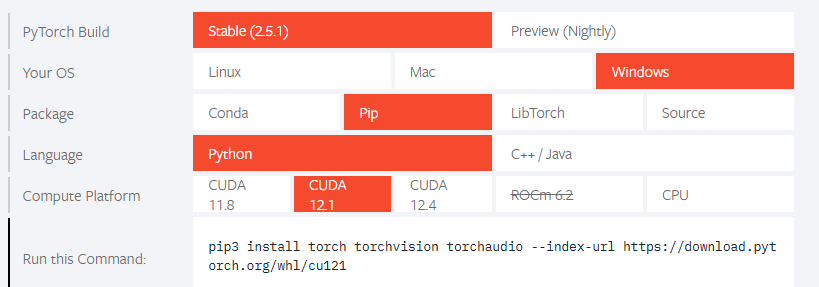
这个是我的问题,但是我是安装torch官网安装的
后来我发现如果==使用清华源加速==,就会安装cpu torch 所以去掉加速: 成功:

如果是vscode的直接reload windows
没放到显卡上,简单的错误,
直接todevice,无需多言
模块未注册:如果你将模块存储在一个普通的 Python 列表(如 self.list = [])中,PyTorch 不会将这些模块视为模型的子模块,因此 DataParallel 不会自动将它们迁移到 GPU 上。
改用modulelist self.ca256 = nn.ModuleList([CoorAtten(self.c_256[i]) for i in range(5)])
简化模型,降低输入分辨率,多卡并行,都是很好的方法
出现这个错误的原因非常简单,调用了自定义的类,但是在自定义的类的__init__函数下面没有写super( XXX, self ).init() 参考:(参考)[https://blog.csdn.net/dongjinkun/article/details/117232330]
Modulelist需要手动for循环forward,建议用sequential
1.他使用了一个三方的alike库,需要
git submodule update --init --recursive # 拉取submodule
不要去pip 安装 alike
2.argsparse的action: (参考)[https://blog.csdn.net/tsinghuahui/article/details/89279152] set action 的意思是只要 –parse(你定义的参数),就会设置为你的set action,比如set_action = True, 那么–test 就是 True,不出现才是设为False
3.PyTorch 从 1.8 版本开始引入了 LazyLinear,允许在初始化时不指定输入特征的维度,直到第一次前向传播时根据输入自动推断。这非常适合您的需求。
4.os.environ[‘CUDA_VISIBLE_DEVICES’] = ‘1’ 这是一个设置gpu的简单方法,这样就不需要逐个改cuda:x了,上面可见cuda设为0/1就是你的0/1
Build with Jekyll and true minimal theme